Overview
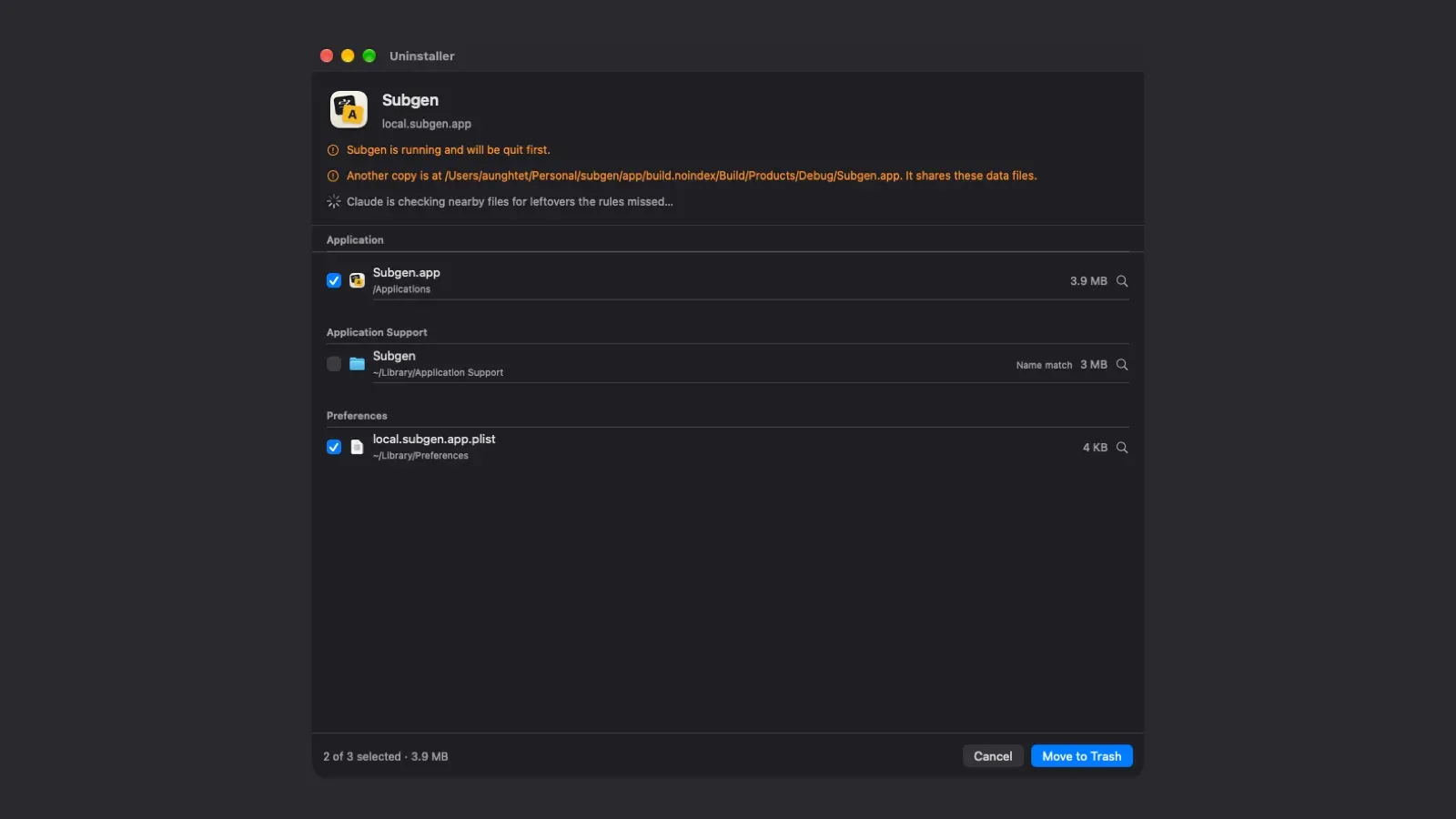
Dragging a Mac app to the Trash leaves its data behind: caches, preferences, containers, saved state, and sometimes a LaunchAgent that keeps starting a helper. Uninstaller adds Uninstall to Finder’s right-click menu. It shows everything it found that belongs to the app, grouped by category with the safe matches already ticked, and moves the selection to the Trash.
The problem
Existing uninstallers tend to sit at one of two extremes:
- Too timid. They match only the exact bundle ID, so helpers and background jobs survive.
- Too eager. They match on loose name searches and offer to delete files that belong to other apps.
Some apps also install launchd jobs and privileged helpers in system folders. Those keep running after the app is gone and need admin rights to remove.
Approach
The project is generated with XcodeGen and has two targets: the app and an embedded Finder Sync extension that adds the menu item.
Identify the app. The scanner reads the app’s bundle ID and team ID, plus the IDs of its own helpers and extensions and its App Groups. It also finds other copies of the same app, since their data lives in the same places. Apps without a bundle ID are refused, because their files can’t be identified safely. Protected system apps are refused too.
Scan about 20 known locations, in both the user and system Library folders. These include Application Support, Containers and Group Containers, Caches, HTTPStorages, WebKit, Preferences, Saved Application State, Logs, LaunchAgents and LaunchDaemons, and PrivilegedHelperTools.
Classify each match. A match can be the app itself, an exact bundle ID, a launchd job whose plist points back to the app, an App Group, or a name-only match. Only the strong kinds are ticked by default. Name-only matches are shown but left unticked.
Key decisions
Everything goes to the Trash. Removal uses the Trash, never a permanent delete, so any uninstall can be undone. The app bundle goes first. If it can’t be removed, its data stays with it.
Stop background jobs before removing them. A LaunchAgent plist is unloaded before it’s moved, so the helper doesn’t keep running from a file that no longer exists.
Ask for admin only when needed. Items in folders the user can’t write to are gathered and removed together with a single admin prompt, after everything else.
In progress: a second opinion from Claude
The rules are deliberately strict, so some leftovers are missed, such as a helper with an unusual name or a sudo rule. I’m building an optional extra review that collects nearby files whose names share a meaningful word with the app. Common words like “helper” and “updater” are filtered out, and anything matching another installed app is skipped. The collected paths go to Claude Code in headless mode, on the user’s own subscription.
Privacy and safety were the design constraints:
- Claude sees file paths and launchd job summaries only, never file contents.
- It can only judge paths it was given. It can’t add its own.
- Nothing it suggests is ticked by default. Each suggestion shows Claude’s reason and whether it was confident or unsure.
- If Claude Code isn’t installed, or doesn’t answer within the time limit, the review is skipped with a clear message.
Outcome
- A working Finder right-click uninstaller with an install script that registers the extension and shows how to enable it.
- A custom “uproot” app icon designed as SVG.
- The Claude review and launchd job detection are in development on a feature branch.
What I’d do next
- Finish and ship the Claude review.
- A dry-run report that can be exported.
- Sign and notarise the app for distribution.